Wednesday, 8 July 2015

What is off page SEO?

Off page SEO refers to techniques that can be used to improve the position of a web site in the search engine results page (SERPs). Many people associate off-page SEO with link building but it is not only that. In general, off Page SEO has to do with promotion methods – beyond website design –for the purpose of ranking a website higher in the search results.
Let’s take it from the beginning…

What is SEO?

Search engine optimization is the term used to describe a set of processes that aim in optimizing a website for search engines. SEO is important not only for getting high quality visitors but it is also a way to increase the credibility of a website and to expand brand awareness.
Search engines are using complex algorithms to determine which pages to include in their index and the order they show these pages in the search results. SEO is the way to ‘speak’ to search engines in a language they can understand and provide them with more details about a website.
SEO has two major components, On Page and off page SEO.

On Page SEO

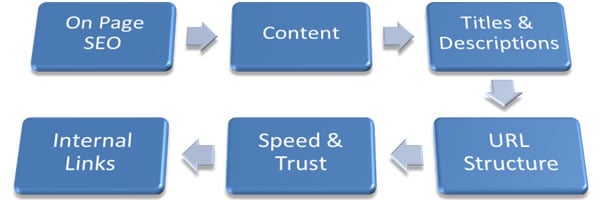
On Page SEO refers to settings you can apply on the website so that it is optimized for search engines. The most important on Page SEO Tips are:
  • Optimized titles and descriptions
  • Proper URL Structures
  • User friendly navigation (breadcrumbs, user sitemaps)
  • Optimized internal links
  • Text Formatting (use of h1,h2,bold etc)
  • Image optimization (image size, proper image names, use of ALT tag)
  • User friendly 404 pages
  • Fast loading pages
  • Google Authorship verification for all pages
  • Top quality fresh content (This is always the most important SEO factor!)
  • External links (no broken links or links to ‘bad’ sites)
You can find out more details about all the above tips in the SEO Tips for beginners article.

Off Page SEO

Off Page SEO
Unlike On- page SEO, off-page SEO refers to activities outside the boundaries of the webpage. The most important are:
  • Link Building
  • Social Media
  • Social bookmarking
We will look at these in detail below but first let me explain about the importance and benefits of off-page SEO.

Why is Off-Page SEO important?

Search engines have been trying for decades to find a way to return the best results to the searcher. To do that, they take into account the on-site SEO factors (described above), some other quality factors and off-page SEO.
Off page SEO gives them a very good indication on how the World (other websites and users) perceive the particular website. A web site that is useful is more likely to have references (links) from other websites; it is more likely to have mentions on social media (Facebook likes, tweets, Pins, +1’s etc.) and it is more likely to be bookmarked and shared among communities of like-minded users.

What are the benefits of ‘off-site SEO’ to website owners?

A successful off-site SEO strategy will generate the following benefits to website owners:
Increase in rankings – The website will rank higher in the SERPs and this also means more traffic.
Increase in PageRank – Page rank is a number between 0 and 10 which indicates the importance of a website in the eyes of Google. It is the system invented by Larry Page (one of Google’s founders) and one of the reasons that Google was so successful in showing the most relevant results to the searcher.  Page rank today is only one out of the 250 factors that Google is using to rank websites.
More exposure – Higher rankings also means greater exposure because when a website ranks in the top positions: it gets more links, more visits and more social media mentions. It’s like a never ending sequence of events where one thing leads to another and then to another etc.

Link Building

Link building is the most popular off-Page SEO method.  Basically by building external links to your website, you are trying to gather as many ‘votes’ as you can so that you can bypass your competitors and rank higher. For example if someone likes this article and references it from his/her website or blog, then this is like telling search engines that this page has good information.
Over the years webmasters were trying to build links to their websites so that they rank higher and they ‘invented’ a number of ways to increase link count. The most popular ways were:
Blog Directories – something like yellow pages but each entry was a link back to a website
Forum Signatures – Many people where commenting on forums for the sole purpose of getting a link back to their website (they included the links in their signature)
Comment link – The same concept as forum signatures where you comment on some other website or blog in order to get a link back. Even worse, instead of using your real name you could use keywords so instead of writing ‘comment by Alex Chris’,  you wrote ‘comment by How to lose weight’ or anything similar.
Article Directories – By publishing your articles on an article directory you could get a link (or 2) back to your website. Some article directories accepted only unique content while other directories accepted anything from spin articles to already published articles.
Shared Content Directories – Websites like hubpages and infobarrel allowed you to publish content and in return you could add a couple of links pointing to your websites.
Link exchange schemes – Instead of trying to publish content you could get in touch with other webmasters and exchange links. In other words I could link your website from mine and you could do the same. In some cases you could even do more complicated exchanges by doing a 3-way link, in other words I link to your website from my website but you link to my website from a different website.
Notice that I used the past tense to describe all the above methods because not only they do not work today, you should not even try them because you are more likely to get a penalty rather than an increase in rankings (especially when it comes to Google).

The birth of black hat SEO

Link building was an easy way to manipulate the search engine algorithms and many spammers tried to take advantage of this by building link networks which gradually lead to the creation of what is generally known as black hat SEO.
Google has become very intelligent in recognizing black hat techniques and with the introduction of Panda and Penguin they have managed to solve the problem and protect their search engine from spammers. Of course there are still exceptions but they are doing advances in every new release of their ranking algorithm and very soon none of these tricks will work.
To “follow” or “nofollow”
In addition to the above and in order to give webmasters a way to link to a website without passing any ‘link juice’ (for example in the case of ads), search engines introduced what is known as the “nofollow” link. This is a special tag you can add to a link (for example: “<a href=http://www.somesite.com rel=”nofollow”>Some Site</a>) that tells search engines not to count the particular link as a ‘vote’ to the referenced website.
This was done so that you can link other websites from yours without taking the risk of being caught for selling or exchanging links.
As a rule of thumb, you should add the nofollow tag on all your external links (within your pages) that go to websites you cannot trust 100%, to ALL your comment links, to ALL your blogroll links and to ALL banner ad links.

What is a good link?

So, if the above links are not useful, what is a good link?
First you should understand that link building it’s not only a matter of quantity but it is a matter of quality as well. In other words it no longer matters how many links are pointing to your website but it is more important from where these links are coming. For example a link from a normal blog does not have the same weight as a link from New York Times or a link from Matt Cutts blog (head of Google Quality team) is not the same as a link from my blog.
The obvious question is how to you get these links?
If you ask Google they will tell you that any links pointing to your website has to be natural links. Natural links are exactly what their name implies. A website owner or blogger likes another website or blog and naturally adds a link to his/her blog.
Does this happen in reality or is it another myth?
It certainly does but you have to try really hard to get to this point. Take for example this blog, there are many incoming links because other webmasters find the content interesting and I also link to other sites in my articles because I find their content interesting and want to inform my readers about it. This is natural link building where a link has more value from the readers’ point of you rather than the search engine point of view. The best way to attract links is to publish content (text, images, videos, infographics etc) that other people would like to link.
If natural links are what I have just described above, in which category do all other links belong?
They belong in the category of artificial links and by adopting such techniques you increase the risk for getting a manual or algorithmic penalty by Google.
Is guest blogging a valid way to build links?
Guest posting can be a valid way to get links back to your website provided that you don’t do it just for links and that you don’t overdo it. You can read these 2 articles to get a complete picture as to when to accept guest posts on your blogand when to guest post on other blogs.

Social Media

Social media is part of ‘off-site SEO’ and if you think about it, it’s also a form of link building. It should be noted that almost all of the links you get from social media sites are “nofollow” but this does not mean that they do not have any value.
Social Media mentions are gaining ground as ranking factors and proper configuration of social media profiles can also boost SEO.

Social Bookmarking

Social bookmarking is not as popular as it used to be in the past but it is still a good way to get traffic to your website. Depending on your niche you can find web sites like reddit.com, digg.com, stumbleupon.com, scoop.it and delicious.com (to name a few) to promote your content.

Conclusion

Off-page SEO is as important as on-site SEO. If you want your SEO campaigns to be successful you have to do both. When thinking about link building don’t take the easy way, but try to get links from hard-to-get places. The more difficult is to get a link, the more value it has.
In the past you could easily get thousands of links and rank higher but nowadays you have to do more than that.  My advice is to forget about link building all together and put all your efforts in making a great website, promote it correctlyand everything else will follow.

5 On-Page SEO techniques That’ll Boost Your Rankings

5 On-Page SEO techniques That’ll Boost Your Rankings (checklist included)
I have already talked about the relation between on-page and off-page SEO and also explained in detail what is off-page SEO.  For the purpose of giving beginners a complete picture, I will explain in brief a few basic terms.

Search Engine Optimization

Search Engine Optimization or SEO in short is a term that encapsulates everything you need to do to improve your web site’s ranking position in the various search engines. This includes configuration settings you have to apply on the website (that’s on page SEO) and techniques you can use outside the boundaries of the website (that’s off page SEO).

Is on-page SEO more important than off-page SEO?

To achieve maximum exposure in the search engines and keep your users happy you need both off-page SEO and on-page SEO. In my opinion on page SEO is more important and I will explain below why.
1) ‘Speak’ the search engines language: It makes more sense to start with on-page SEO and get it right rather than trying to convince search engines to give you better ranking with off page SEO. Search engines are computer programs (software) and they understand a particular language. With SEO and especially on page SEO you ‘speak’ their language and your goal is to help them understand what you website is about. In other words the more signals you can give them, the more are your chances of achieving better rankings.
2) On Page SEO is about the user as well: Never forget that your primary target is to keep your users happy. Off Page SEO may bring traffic to the website but if it is not setup correctly, if it is not user friendly the results will be disappointing.
3) Many websites get it wrong: It’s amazing but it is true that the majority of websites today are not optimized for search engines. Despite the plethora of information about SEO many website owners believe that it does not worth to even do SEO and they quit before starting. For those cases on-page SEO has a lot to offer both in terms of usability but in terms of traffic as well.
4) On Page SEO is sometimes all you need: If you are running a website for a small business and you need to get local customers searching for various terms on Google then on page SEO is all you need to do.
5) Off page SEO comes after on page SEO: In order to start thinking on how you can promote your website you need to be sure that the website is optimized and in good condition. So the first step is to work with on-site SEO first and then go off-site.

5 on page SEO techniques for better rankings

Now that the theory about SEO and importance of on-page SEO is justified, let’s move on to the practical part.
There are many on page SEO techniques and not only 5, but for the purpose of this post I will explain below what I think are the absolute settings you have to apply on your website today.  I strongly suggest that you also read (links will open in a new window):
10 SEO Tips for startups and small business owners
Top 10 SEO Copywriting tips for getting high rankings
10 SEO Mistakes that weaken your rankings
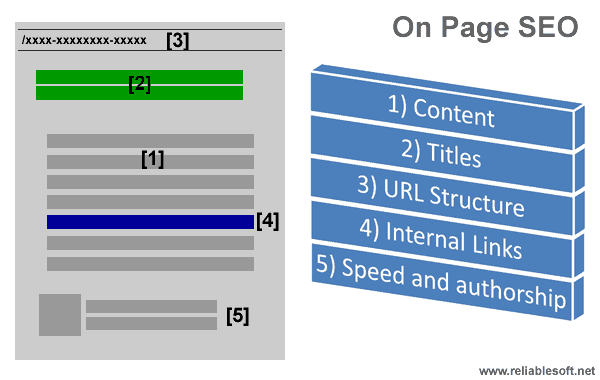
On Page SEO

1. Content comes first

A website with brilliant content can do great with or without SEO, a website with bad content will not survive with or without SEO, a website with good content can become even better with SEO!
So, what is considered good content?
Original Content (articles, text, images, videos, presentations, infographics, comments etc.) – No copies or re-writes of existing articles
Content published on your website first – Even if it’s your own content, if you have already published it on another website then it’s not good for your site.
Content that includes text as well – Try to have text to accompany your non-text content. For example if you post videos on your website try to add a text description as well. If you add images try to describe in words what the image is all about.
Content that is useful – Don’t publish content for the sake of publishing. Before hitting the publish button make sure that what goes live adds value to your website.
Content that is well researched – Users don’t want to read quickly prepared posts and neither does search engines. If you are writing about a certain topic or answering a question make sure that what you write is justified and covers both sites of a story. Long articles are proven to rank better than short articles.
Posting frequency – 2 things are important when it comes to posting frequency. First is to have fresh content on your website and second to establish a publishing strategy and stick to it.

2. Page titles, description and formatting

This is SEO 101 but very important as well. When search engines are reading your pages among the things they check includes the page title, the description of the page, the major headings and images. They do so because they need to understand what the page is all about and then based on other factors as well (off page SEO, domain authority, competition etc.), they will place your page in a position in their index.
Page titles – Each page must have a unique title that will help both search engines and users understand what the page is about. A page with title “On Page SEO Tips” is better than a page with title “index.html”.
Descriptions – The page description is what the searcher will see in the search engine results page. So it has to be descriptive, up to 150 characters and unique for each page. It’s your opportunity to advertise your page and convince the searcher to click your link and visit your website rather than selecting one of the other links.
Formatting – A page needs to be properly formatted. Think of it like a report which needs to have a heading (h1) and sub headings (h2). Important parts of the report are highlighted with bold, underline or italics.
Do not just throw text on the page but make sure that it is readable as well. Besides the formatting practices explained above you also need to use a good size font (at least 12px) and split the text into small paragraphs (max 4-5 lines).
Images – Images are important but these should not increase the loading time of the website. Best practices for using images:
1) Use original images. If you need to use an existing image from the web you need to reference the source.
2) Optimise the size of the images – the smaller the size (in bytes) of the image the better. Use yahoo smush it to reduce the size of an image without sacrificing the quality.
3) Use ALT tag to describe the image – This helps search engines understand what the image is about.
4) Use descriptive filenames – Don’t just name your image ‘image1.jpg’ but try to use descriptive filenames, for example ‘Man doing push-ups’.
5) Use a Content Delivery Network – If you have a lot of images in a single page you can use a CDN service (from Amazon or Google) that will make your page load faster. In simple terms your images will be hosted and served by a number of servers and this speeds up the loading process.
You can also read my seo tips for beginners article for more examples of optimized titles and descriptions and for best practices about the use of images.

3. URL Structure

The URL structure is an important part of on-page SEO. Whenever I talk about URL structure, I prefer to split it into 4 major parts:
1) Permanent links – Permanent links are the URL’s of each page. Good URLs should be less than 255 characters and use hyphens to ‘-‘separate the different parts.
2) Categories – Group your pages into categories to help users and search engines find what they want faster. It’s like having a warehouse with lots of uncategorised items versus a warehouse with all the items assigned to a dedicated category. You can have sub-categories as well but my advice is not to go over one level. For example a good category structure is:
Reliablesoft > Social Media > Facebook and not Reliablesoft > Social Media > Facebook > Tips
3) Breadcrumb – A breadcrumb is also important for all your pages because it allows users to navigate your website in a structured way since they always know where they are and how deep below the home page.
4) User Sitemap – One of your options in the main menu should be the User Sitemap. This is an html file that represents the structure of your website. Visit my sitemap for an example.

4. Internal linking

Linking to pages within your website is very important for SEO because:
1) It’s like building your own web: If you watch the nice tutorial by Google onhow search works, you will see that the first step a search engine spider will do is follow the links they find. So when they arrive at your page, if you don’t have any other links within the text they will read your page and go but if you have links pointing to other pages within your website they will take those into account as well.
2) It’s a way to let search engines know about your other pages: As explained above when search engines find a page with links, they will go and read those pages as well so you can use this technique to tell search engines about pages of your website they have not yet discovered.
3) It’s a way to tell search engines which are your most important pages:Every website has some pages that are more important than others. Internal linking is one of the ways to pin-point the most important pages by sending them more internal links.
4) It’s a way to increase time on site – A user that is reading your post is more likely to click on a link to read more about a certain subject and thus increase both the time spend on your website and the number of pages per visit.
Best practices for internal linking:
1) Don’t use keywords only for your internal links
2) Add internal links when they are useful for your reader
3) No more than 7-8 internal links per page (this is my opinion and not based on any research or studies)
4) If applicable you can also use ‘related posts’ at the end of each post for internal linking

5. Speed and authorship

Last but not least, 2 SEO techniques that are becoming more and more important especially after the release of penguin 2.0 (or 4.0 as some people like to say it): Speed and authorship.
Speed: Google is investing a huge amount of money to make the web faster. In every Google I/O someone will talk about the importance of speed and their desire to include the fastest websites in their index. In order to ‘force’ web site owners to take speed into account they have officially added speed as one of the ranking factors.
So, we know for sure that web site speed does matter when it comes to SEO and ranking. As a webmaster your job is to make sure that your website loads as fast as possible by taking into account Google’s recommendations.
Google authorship: Google is preparing for the next generation of Search and their effort is to rank higher webpages written by people who have authority on the particular subject. One of the ways to establish authority is by correlating the content you publish on the web with your Google+ profile. Then depending on how many followers you have and who follows you, your ranking may change.
Google authorship is still at its early stages but it’s gaining ground fast so you have to create a Google+ profile and bind the profile with your content.

On-Page SEO Checklist

If you have read the article up to this point, the main tips are summarized in the check-list below: (You can also download in PDF format for printing – On page SEO Checklist)
On-Page SEO Checklist
Content
1Content is original – copyscape checked?
2Content is first published on your website?
3Content has enough descriptive text?
4Content is well researched with references?
5Do you have a clear publishing strategy?
Pages Titles, description and formatting
6Page titles are unique for each page?
7Descriptions are unique and up to 150 characters?
8Text is properly formatted using H1, H2, Bold, Italics?
9Text is split into small paragraphs?
10Font size is easy to read on small screens (tablets) as well?
11Image size is optimized using smushit?
12All images have alt tags defined?
13Image filename is descriptive?
URL Structure
14Permanent links use ‘-‘ as separator ?
15Website pages/posts are grouped into categories?
16There is breadcrumb on all posts/pages?
17There is an HTML User Sitemap?
Internal Links
18Pages have internal links?
19There is a ‘Related posts’ section at the end of each page?
20Internal links use both keyword and non-keyword anchor text?
Speed and Authorship
21Website scores more than 90% when checked by Google page speed insights?
22Google Authorship is implemented for each and every post/page available on the website?
For website owners that are new to SEO or simply do not have the time to deal with web site optimization, you can always hire a trusted SEO firm to do the work for you. Have a look at our great range of SEO packages, suitable for every online business, customized to your own needs and requirements and at competitive prices.