Tuesday, 29 March 2016

Great On-Page SEO Techniques

There are many people who are just starting to blog and many more that have run their own site for a while, that don’t know what SEO is and how to implement it!
SEO simply stands for Search Engine Optimisation. This is where you construct your web pages and implement certain techniques to help you rank as high as possible on search engine result pages (SERPs). The higher your pages can rank on Google/Bing/Yahoo/etc. results pages, the more traffic your site is likely to get.
Now, SEO can be split up into two separate categories; On-Page SEO & Off-Page SEO.
On-Page SEO refers to all the things that you can do ON your website to help you rank higher, such as page titles, internal linking, meta tags & descriptions, etc.
Off-Page SEO refers to all the things that you can do directly OFF your website to help you rank higher, such as social networking, article submission, forum & blog marketing, etc.
In today’s post we will be looking specifically at On-Page SEO and some of the most effective ways toincrease your page rankings on search engines.
Search Engine Optimisation

On-Page Search Engine Optimisation

1. Page Titles

Your page titles are one of the most important SEO factors on your site. Each of your pages & posts should have its own unique title, which includes the main keywords for that page.
For example, you could write a blog post about a new chocolate cake recipe that you have tried. It is therefore vitally important that you include ‘Chocolate Cake Recipe’ within your post title, perhaps “Easy Chocolate Cake Recipe” or “ Chocolate Cake Recipe for kids”, etc.
This way, whenever someone searches for Chocolate Cake Recipes in a search engine, your post has a better chance of showing up because you have included those keywords.

2. Meta Descriptions

Many people forget to include meta descriptions for their pages. These descriptions are an important place to include relevant keywords for your content, as these are used within the search results when your page is listed.
For instance, if we continue to use the ‘Chocolate Cake Recipe’ example, then a good meta description for that page would include those keywords and related ones. So, “This easy chocolate cake recipe is possibly the most delicious, mouth watering, chocolatey cake ever made.” would be a great meta description to use, as it is relatively short, whilst containing a number of specific keywords.

3. Meta Tags

For each of your pages, you can include a set of keywords in the form of meta tags. These should be all the relevant keywords of your content, which you will have researched previously.
I use a WordPress plug-in on my sites called ‘All In One SEO Pack’. This allows me to enter all of mymeta tag keywordsmeta description and page title at the bottom of each of my posts before publishing. This simply inserts all of the information into your page HTML format for you, making your life a little easier.
Page Title, Meta Description and Meta Tags

4. URL Structure

Including search engine friendly URLs for each of your pages is highly recommended, as these bring better crawling. Shorter URLs seem to perform better in search engine results, however that is not the only factor.
URLs that include targeted keywords, also perform better. The location of these keywords can also be a major influence. For example site.com/keyword would perform better than site.com/365/738/subfolder/keyword etc.
5. Body Tags (H1, H2, H3, H4, etc.)
When writing your articles, you should break up your content into smaller sections & paragraphs to make it easier for people to read. These sections can be given heading, which is where H1, H2,H3, H4, etc. tags are used.
Generally H1 tags are reserved for your main page title, with subsequent headings (just like the ones I have used throughout this post) being issued H2, H3, etc. Search engines use these to determine what is important within your content. This is why keyword rich headines are more useful than generic ones. Make sure you write keyword rich headings in the order of priority in H1, H2 and H3 title tags. They are used by many crawlers to differentiate important content.

6. Keyword Density

Including relevant keywords throughout your content is very important, as it helps search engines work out what your content is about. However, try not to excessively repeat and overuse keywords just for search engine robots. This can lead to your site being banned from search engines.
To avoid this, try to keep your keyword density to roughly 2-5%. If you find this hard, get out a thesaurus and broaden your writing vocabulary. This way, you are still writing about the same thing, without risk of being banned.

7. Image SEO

On-Page SEO
Using images within your content is a great way to make your site more visually appealing and break up boring chunks of text. You can utilise these images to help improve your site SEO.
All your uploaded images have titles, so treat them just the same as your page titles. Including relevant keywords can help people find your site when searching on Google Images.
You can also include Alt Text and Descriptions for your images, making them even more useful with SEO.

8. Internal Linking

People often think that the only links that count are those from other websites. While these links are important, these are not the only important links!
Placing links to your other website pages, is a great way of improving your site and used properly,internal links can be a useful weapon in your SEO arsenal. Not only does it make it much easier for your visitors to navigate around your site and find all of your content, but it also ensures that your site gets properly crawled allowing the search engines to find all of your pages. It also helps to build the relevancy of a page to relevant keywords and phrases, whilst also helping to increase theGoogle PageRank of your pages.
There are a number of different methods that you can use to improve your internal linking structure. The main being; content links and permanent navigation links.
For bloggers, content links are very useful when used properly. These are links that are placed within your article posts, which redirect people to other relevant pages on your site. For example, this post is focused on increasing traffic to your site, so readers may also find a post on ‘How To Drive Traffic To Your Blog‘ useful. Perhaps other people are just starting out blogging and want to learn more.

Summary

These 8 techniques are just some of the ways that you can improve your on-page SEO. Any one used independently of the others won’t make much difference to your site ranking, however when used together, they can help to improve your site traffic.
They will help to get your pages working better, they will help to get your entire site crawled by search engine spiders, they will help increase the value of internal pages and they will build the relevancy of internal pages to specific keyword phrases.
So, it pays to spend some time implementing these to improve your site! Please leave your comments below & feel free to ask any questions.

Tuesday, 22 March 2016

55 Quick SEO Tips Even Your Mother Would Love

Everyone loves a good tip, right? Here are 55 quick tips for search engine optimization even your mother could use to get cooking. Well, not my mother, but you get my point. Most folks with some web design and beginner SEO knowledge should be able to take these to the bank without any problem.
1. If you absolutely MUST use Java script drop down menus, image maps or image links, be sure to put text links somewhere on the page for the spiders to follow.
2. Content is king, so be sure to have good, well-written, and unique content that will focus on your primary keyword or keyword phrase.
3. If content is king, then links are queen. Build a network of quality backlinks. Remember, if there is no good, logical reason for a site to link to you, you don’t want the link.
4. Don’t be obsessed with PageRank. It is just one isty bitsy part of the ranking algorithm. A site with lower PR can actually outrank one with a higher PR.
5. Be sure you have a unique, keyword focused Title tag on every page of your site. And, if you MUST have the name of your company in it, put it at the end. Unless you are a household name, your business name will probably get few searches.
6. Fresh content can help improve your rankings. Add new, useful content to your pages on a regular basis. Content freshness adds relevancy to your site in the eyes of the search engines.
7. Be sure links to your site and within your site use your keyword phrase. In other words, if your target is “blue widgets” then link to “blue widgets” instead of a “Click here” link.
8. Focus on search phrases, not single keywords, and put your location in your text (“our Palm Springs store” not “our store”) to help you get found in local searches.
9. Don’t design your web site without considering SEO. Make sure your web designer understands your expectations for organic SEO. Doing a retrofit on your shiny new Flash-based site after it is built won’t cut it. Spiders can crawl text, not Flash or images.
10. Use keywords and keyword phrases appropriately in text links, image ALT attributes and even your domain name.
11. Check for canonicalization issues – www and non-www domains. Decide which you want to use and 301 redirect the other to it. In other words, if http://www.domain.com is your preference, then http://domain.com should redirect to it.
12. Check the link to your home page throughout your site. Is index.html appended to your domain name? If so, you’re splitting your links. Outside links go to http://www.domain.com and internal links go to http://www.domain.com/index.html.
Ditch the index.html or default.php or whatever the page is and always link back to your domain.
13. Frames, Flash and AJAX all share a common problem – you can’t link to a single page. It’s either all or nothing. Don’t use Frames at all and use Flash and AJAX sparingly for best SEO results.
14. Your URL file extension doesn’t matter. You can use .html, .htm, .asp, .php, etc. and it won’t make a difference as far as your SEO is concerned.
15. Got a new website you want spidered? Submitting through Google’s regular submission form can take weeks. The quickest way to get your site spidered is by getting a link to it through another quality site.
16. If your site content doesn’t change often, your site needs a blog because search spiders like fresh text. Blog at least three time a week with good, fresh content to feed those little crawlers.
17. When link building, think quality, not quantity. One single, good, authoritative link can do a lot more for you than a dozen poor quality links, which can actually hurt you.
18. Search engines want natural language content. Don’t try to stuff your text with keywords. It won’t work. Search engines look at how many times a term is in your content and if it is abnormally high, will count this against you rather than for you.
19. Text around your links should also be related to your keywords. In other words, surround the link with descriptive text.
20. If you are on a shared server, do a blacklist check to be sure you’re not on a proxy with a spammer or banned site. Their negative notoriety could affect your own rankings.
21. Be aware that by using services that block domain ownership information when you register a domain, Google might see you as a potential spammer.
22. When optimizing your blog posts, optimize your post title tag independently from your blog title.
23. The bottom line in SEO is Text, Links, Popularity, and Reputation.
24. Make sure your site is easy to use. This can influence your link building ability and popularity and, thus, your ranking.
25. Give link love, Get link love. Don’t be stingy with linking out. That will encourage others to link to you.
26. Search engines like unique content that is also quality content. There can be a difference between unique content and quality content. Make sure your content is both.
27. If you absolutely MUST have your main page as a splash page that is all Flash or one big image, place text and navigation links below the fold.
28. Some of your most valuable links might not appear in web sites at all but be in the form of e-mail communications such as newletters and zines.
29. You get NOTHING from paid links except a few clicks unless the links are embedded in body text and NOT obvious sponsored links.
30. Links from .edu domains are given nice weight by the search engines. Run a search for possible non-profit .edu sites that are looking for sponsors.
31. Give them something to talk about. Linkbaiting is simply good content.
32. Give each page a focus on a single keyword phrase. Don’t try to optimize the page for several keywords at once.
33. SEO is useless if you have a weak or non-existent call to action. Make sure your call to action is clear and present.
34. SEO is not a one-shot process. The search landscape changes daily, so expect to work on your optimization daily.
35. Cater to influential bloggers and authority sites who might link to you, your images, videos, podcasts, etc. or ask to reprint your content.
36. Get the owner or CEO blogging. It’s priceless! CEO influence on a blog is incredible as this is the VOICE of the company. Response from the owner to reader comments will cause your credibility to skyrocket!
37. Optimize the text in your RSS feed just like you should with your posts and web pages. Use descriptive, keyword rich text in your title and description.
38. Use keyword rich captions with your images.
39. Pay attention to the context surrounding your images. Images can rank based on text that surrounds them on the page. Pay attention to keyword text, headings, etc.
40. You’re better off letting your site pages be found naturally by the crawler. Good global navigation and linking will serve you much better than relying only on an XML Sitemap.
41. There are two ways to NOT see Google’s Personalized Search results:
(1) Log out of Google
(2) Append &pws=0 to the end of your search URL in the search bar
42. Links (especially deep links) from a high PageRank site are golden. High PR indicates high trust, so the back links will carry more weight.
43. Use absolute links. Not only will it make your on-site link navigation less prone to problems (like links to and from https pages), but if someone scrapes your content, you’ll get backlink juice out of it.
44. See if your hosting company offers “Sticky” forwarding when moving to a new domain. This allows temporary forwarding to the new domain from the old, retaining the new URL in the address bar so that users can gradually get used to the new URL.
45. Understand social marketing. It IS part of SEO. The more you understand about sites like Digg, Yelp, del.icio.us, Facebook, etc., the better you will be able to compete in search.
46. To get the best chance for your videos to be found by the crawlers, create a video sitemap and list it in your Google Webmaster Central account.
47. Videos that show up in Google blended search results don’t just come from YouTube. Be sure to submit your videos to other quality video sites like Metacafe, AOL, MSN and Yahoo to name a few.
48. Surround video content on your pages with keyword rich text. The search engines look at surrounding content to define the usefulness of the video for the query.
49. Use the words “image” or “picture” in your photo ALT descriptions and captions. A lot of searches are for a keyword plus one of those words.
50. Enable “Enhanced image search” in your Google Webmaster Central account. Images are a big part of the new blended search results, so allowing Google to find your photos will help your SEO efforts.
51. Add viral components to your web site or blog – reviews, sharing functions, ratings, visitor comments, etc.
52. Broaden your range of services to include video, podcasts, news, social content and so forth. SEO is not about 10 blue links anymore.
53. When considering a link purchase or exchange, check the cache date of the page where your link will be located in Google. Search for “cache:URL” where you substitute “URL” for the actual page. The newer the cache date the better. If the page isn’t there or the cache date is more than an month old, the page isn’t worth much.
54. If you have pages on your site that are very similar (you are concerned about duplicate content issues) and you want to be sure the correct one is included in the search engines, place the URL of your preferred page in your sitemaps.
55. Check your server headers. Search for “check server header” to find free online tools for this. You want to be sure your URLs report a “200 OK” status or “301 Moved Permanently ” for redirects. If the status shows anything else, check to be sure your URLs are set up properly and used consistently throughout your site.

Sunday, 28 February 2016

On Page SEO

On page SEO is all about the SEO activity that happens on your site. We believe that on page SEO is often a hugely underestimated part of your SEO strategy. In a world where everyone is focusing on links, the importance of on page is often forgotten. We believe that content is, and always will be King, and on page SEO is all about content.
Often website owners are quick to identify their top terms, their “hero keywords”, that generate the most traffic. Yet, most traffic, and often the most valuable traffic, comes from “long tail traffic”.
Graph_Keywords-1
We therefore believe that investing all your efforts in ranking for your top terms is a bit like investing in a whole football team of strikers. Which doesn’t necessarily get you more goals!
Graph_GoalConversion-1
Verve Search therefore insist on building an on page SEO strategy that doesn’t only cover your key  terms and phrases, but also assists the growth of your site’s long tail reach.
Here are some of the most common on page SEO areas we always cover:
  • Keyword & Competitor research (these should always go hand in hand). One without the other is a bit like Mick without Keith (yep that’s a Stone’s reference).
  • Keyword mapping
  • Keyword gap analysis and longtail keyword targeting
  • Content optimisation (title, meta descriptions, H1 and main body content)
  • Internal link optimisation
  • Additional content and on-going optimisation (often achieved in the form of blogging)
To learn more about On Page SEO view our collated Knowledge Bank below:

8 Great On-Page SEO Techniques

There are many people who are just starting to blog and many more that have run their own site for a while, that don’t know what SEO is and how to implement it!
SEO simply stands for Search Engine Optimisation. This is where you construct your web pages and implement certain techniques to help you rank as high as possible on search engine result pages (SERPs). The higher your pages can rank on Google/Bing/Yahoo/etc. results pages, the more traffic your site is likely to get.
Now, SEO can be split up into two separate categories; On-Page SEO & Off-Page SEO.
On-Page SEO refers to all the things that you can do ON your website to help you rank higher, such as page titles, internal linking, meta tags & descriptions, etc.
Off-Page SEO refers to all the things that you can do directly OFF your website to help you rank higher, such as social networking, article submission, forum & blog marketing, etc.
In today’s post we will be looking specifically at On-Page SEO and some of the most effective ways toincrease your page rankings on search engines.
Search Engine Optimisation

On-Page Search Engine Optimisation

1. Page Titles

Your page titles are one of the most important SEO factors on your site. Each of your pages & posts should have its own unique title, which includes the main keywords for that page.
For example, you could write a blog post about a new chocolate cake recipe that you have tried. It is therefore vitally important that you include ‘Chocolate Cake Recipe’ within your post title, perhaps “Easy Chocolate Cake Recipe” or “ Chocolate Cake Recipe for kids”, etc.
This way, whenever someone searches for Chocolate Cake Recipes in a search engine, your post has a better chance of showing up because you have included those keywords.

2. Meta Descriptions

Many people forget to include meta descriptions for their pages. These descriptions are an important place to include relevant keywords for your content, as these are used within the search results when your page is listed.
For instance, if we continue to use the ‘Chocolate Cake Recipe’ example, then a good meta description for that page would include those keywords and related ones. So, “This easy chocolate cake recipe is possibly the most delicious, mouth watering, chocolatey cake ever made.” would be a great meta description to use, as it is relatively short, whilst containing a number of specific keywords.

3. Meta Tags

For each of your pages, you can include a set of keywords in the form of meta tags. These should be all the relevant keywords of your content, which you will have researched previously.
I use a WordPress plug-in on my sites called ‘All In One SEO Pack’. This allows me to enter all of mymeta tag keywordsmeta description and page title at the bottom of each of my posts before publishing. This simply inserts all of the information into your page HTML format for you, making your life a little easier.
Page Title, Meta Description and Meta Tags

4. URL Structure

Including search engine friendly URLs for each of your pages is highly recommended, as these bring better crawling. Shorter URLs seem to perform better in search engine results, however that is not the only factor.
URLs that include targeted keywords, also perform better. The location of these keywords can also be a major influence. For example site.com/keyword would perform better than site.com/365/738/subfolder/keyword etc.
As you can see for this page, the URL is http://onlineincometeacher.com/traffic/on-page-seo-techniques/ I have included the keywords that are relevant for this post.

5. Body Tags (H1, H2, H3, H4, etc.)

When writing your articles, you should break up your content into smaller sections & paragraphs to make it easier for people to read. These sections can be given heading, which is where H1, H2,H3, H4, etc. tags are used.
Generally H1 tags are reserved for your main page title, with subsequent headings (just like the ones I have used throughout this post) being issued H2, H3, etc. Search engines use these to determine what is important within your content. This is why keyword rich headines are more useful than generic ones. Make sure you write keyword rich headings in the order of priority in H1, H2 and H3 title tags. They are used by many crawlers to differentiate important content.

6. Keyword Density

Including relevant keywords throughout your content is very important, as it helps search engines work out what your content is about. However, try not to excessively repeat and overuse keywords just for search engine robots. This can lead to your site being banned from search engines.
To avoid this, try to keep your keyword density to roughly 2-5%. If you find this hard, get out a thesaurus and broaden your writing vocabulary. This way, you are still writing about the same thing, without risk of being banned.

7. Image SEO

On-Page SEO
Using images within your content is a great way to make your site more visually appealing and break up boring chunks of text. You can utilise these images to help improve your site SEO.
All your uploaded images have titles, so treat them just the same as your page titles. Including relevant keywords can help people find your site when searching on Google Images.
You can also include Alt Text and Descriptions for your images, making them even more useful with SEO.

8. Internal Linking

People often think that the only links that count are those from other websites. While these links are important, these are not the only important links!
Placing links to your other website pages, is a great way of improving your site and used properly,internal links can be a useful weapon in your SEO arsenal. Not only does it make it much easier for your visitors to navigate around your site and find all of your content, but it also ensures that your site gets properly crawled allowing the search engines to find all of your pages. It also helps to build the relevancy of a page to relevant keywords and phrases, whilst also helping to increase theGoogle PageRank of your pages.
There are a number of different methods that you can use to improve your internal linking structure. The main being; content links and permanent navigation links.
For bloggers, content links are very useful when used properly. These are links that are placed within your article posts, which redirect people to other relevant pages on your site. For example, this post is focused on increasing traffic to your site, so readers may also find a post on ‘How To Drive Traffic To Your Blog‘ useful. Perhaps other people are just starting out blogging and want to learn more.

Summary

These 8 techniques are just some of the ways that you can improve your on-page SEO. Any one used independently of the others won’t make much difference to your site ranking, however when used together, they can help to improve your site traffic.
They will help to get your pages working better, they will help to get your entire site crawled by search engine spiders, they will help increase the value of internal pages and they will build the relevancy of internal pages to specific keyword phrases.
So, it pays to spend some time implementing these to improve your site! Please leave your comments below & feel free to ask any questions.

10 TIPS FOR BETTER SEARCH ENGINE OPTIMIZATION


Alright, bloggers and website owners. let’s sit down for a cup’a tea and talk about S to the E to the O. What is SEO? It stands for Search Engine Optimization and you’ve probably heard the term if you’ve been around the internet for a while. Why is it important? I will tell you…
SEO is important because, in simple terms, it is how people find your site in search engines. Search engine traffic can contribute to a huge amount of your visitors, and if done right, can boost your presence online. Without getting too technical, here are some tips for making your website or blog search engine friendly:
1. Title Your Posts Properly
Whenever you title a post, think about what you would search for in Google if you were looking for an article about the topic. Think about how other people might phrase the same search term and try to create your title from that. You don’t have to do this for every single post, just the most important ones that you actually want people to be able to find through a search.
Example of a bad title: She’s Got Wind in Her Hair…
Example of a good title: 7 Heat Friendly Summer Hair Styles
2. Speaking of Titles…
Your post title plays a very important role in SEO. Not only does it appear on the actual post page, but also in the browser’s title bar. To maximize the impact of your title, it’s best that your post title be the first element of the title that appears in the browser address bar. If you notice, Blogger does this a little backwards, placing the title of your blog before the title of your post.  For example, “Name of your blog: Title of your post”. For better SEO, it should be formatted like this instead: “Title of your post: Name of your blog”. To change this in Blogger, you will have to get your hands a little dirty with some HTML editing. Open your HTML editor page and find:
<title><data:blog.pageTitle/></title>
and replace it with:
<b:if cond=’data:blog.pageType == &quot;item&quot;’>
<title><data:blog.pageName/> | <data:blog.pageTitle/></title>
<b:else/><title><data:blog.pageName/><data:blog.pageTitle/></title>
</b:if>
Now your post title will appear before the blog title, only if that page is a post page.
3. Your Content Matters
What a novel concept, right? Your actual article/post has to have some substance. If you caninclude popular search terms/phrases within the post, even better. For example, my 30 Day Shred post is my highest ranking search engine post, and still appears on the front page of Google if you search “30 Day Shred Results”. The term “30 Day Shred” appears multiple times throughout the post. Did you know that I do that purposely? As long as it flows with your content and doesn’t read like a bunch of random keywords or search terms, you should think about this when creating a post.
4. Stop Stuffing in the Keywords
Many people have this idea that search engines strictly read meta data and that you should fill your meta tags up with a bunch of keywords and descriptions to get the best results. This isn’t true at all. In fact, Google doesn’t even use the keyword meta tag anymore to crawl your sites. Stuffing your site full of random keywords can actually have a negative effect on your ranking. Those “labels” or “tags” you place on your posts are not there for SEO keyword purposes, they are there to categorize your content so others can easily find past posts under the same topic. If you overuse keywords on your page or in your coding, Google sees this as keyword spamming… and spammers never get anywhere in life ðŸ˜‰
5.  Use Text Instead of Images
When it’s possible to do so, use actual text instead of images. Obviously you can’t have a picture made of text, but if you have headings, for example, instead of making them graphic titles, keep them as text. Search engines can’t really read images for content (more on this below)… what they want is your text content! Even better? Wrap them in a heading tag <h1>Your Heading</h1>. Google looks for heading tags when crawling your site, so wrapping your heading in that little bit of HTML code helps for sure!
6. Image searches are cool too
Contrary to what I said above, Google can find your images, but in a different way. Instead of appearing in the text results, they appear in the image search results. To make the most of this,title your images properly. Instead of uploading a photo as IMG_920.jpg, title that image to match the topic of your post, for example, “seo-basics-for-bloggers.jpg” is something I would name an image in this post.
7. Get Yourself Out There
Probably the toughest part of any website marketing is getting your website out there, and linked on other websites. Websites with high rankings that link back to your website add value to your site. Google sees your site as a site that somebody important is talking about, and therefore wants to crawl you. Think of these as bonus points for your blog ;).  The greater visibility you can gain for your site, the better. Share your links on social networking sites and get people to check you out.
8. Link Past Posts
Another trick is to link back to some of your past posts in your new posts that have to do with the same sort of topic. Whenever you have a link on a page, a search engine will crawl through it. Links are like doorways to more content. You want search engines seamlessly crawling your site… and often. The easier you make it for them to navigate around your website, the better. Example: see some more of my blogging tips!
9. Image Maps Help Nobody
I am begging you, please refrain from using image maps on your website or blog. Image maps help nobody. They don’t work properly in some browsers, and hinder navigation because your actual link is not truly attached to a single image. It’s like an invisible box floating above an image with a link in it. It makes no sense. Instead, you should check out my YouTube tutorial on how to create a header with image links properly.
10. Clean Up Your Website
Like I said above, links and text content make search engines crawl through your site seamlessly. If your site is full of clutter, random images and banners, and doesn’t have a good flow, it will be difficult to navigate through. Remove any old outgoing links, unused images, and clutter, and make your site more about the content than anything else.
Hopefully you will be able to take some of these tips and tricks and apply them to your site. I couldn’t cover everything in this post, but gave you some good starting points! SEO really starts with thinking about how you create a post. If you think of it in terms of what users would be searching for, then that is half the battle. Remember, there is no quick and easy way to get more traffic to your website. Nobody will market your site for you but you. It’s constant work, but once you start seeing your work pay off it’s worth it!
Let me know if you enjoyed these tips and if you think you can implement them into your blog!

Wednesday, 5 August 2015

Twitter Ads Campaigns: A Simple Setup Guide

twitter ads
Twitter is a great marketing channel for driving traffic and generating leads. In fact42% of Twitter users follow brands or companies, which means if you’re not using Twitter for your business yet, you should learn how to integrate Twitter into your social media marketing strategy.
If you do already have a Twitter account set up for your business, you might consider supplementing your organic efforts with some of the paid promotional opportunities that Twitter offers. Using Twitter Ads is an easy way to get your tweets in front of larger audiences than just those who follow you, which is particularly useful if you’re looking to generate more new leads for your database. And you don’t necessarily have to spend a fortune on it, either -- Twitter ads can be effective even on a relatively small budget.
So, how do you get started? Let’s go ahead and walk through the four basic steps to setting up your Twitter ad campaigns, and how to decide on the best structure for your campaigns.

4 Steps to Set Up a Twitter Ads Campaign

Step 1: Choose Promoted Tweets vs. Promoted Accounts

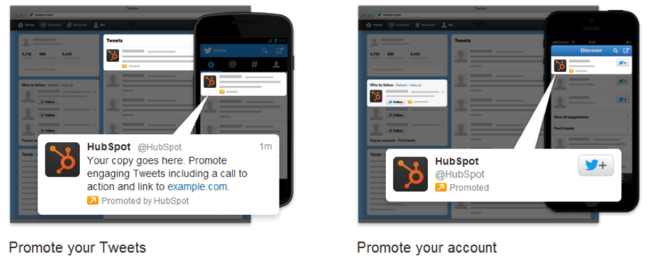
The first decision you need to make when setting up your Twitter ads is whether you’d like to promote your tweets, or promote your Twitter account.
What’s the difference? Promoting tweets will allow your tweets to appear in users’ Twitter streams or in Twitter search results, whereas promoting your account will display your username under the “Who to Follow” section in users’ homepages.
Promoted Tweets vs. Promoted Account
How do I choose? If you’re simply looking to grow your follower base and build up your audience, Promoted Accounts is a good choice. However, if your primary goal is lead generation, you’ll definitely want to put your money toward Promoted Tweets. Why? Because promoting tweets instead of your account allows you to craft those tweets to promote your content and links to your landing pages, where these Twitter users can then convert on your offers and become leads. Promoted tweets give you a lot more flexibility in terms of the content you’re choosing to show to your audience, so when in doubt, I’d recommend selecting this option.

Step 2: Select Primary Targeting Criteria

The next step in setting up your campaign will be determining your targeting criteria. It’s important to customize your audience to be a good fit for your company and your message, and that way you’re only paying for clicks from folks who might have some interest in downloading your content or learning more about your product or service. A more targeted audience is more likely to help you generate qualified leads.
What are my options? You can target your campaigns by interests and followers, or by keywords (only if you’re promoting tweets, not accounts). Twitter now also has a Tailored Audiences feature, which gives you the option to target your website visitors or lists pulled from your database. 
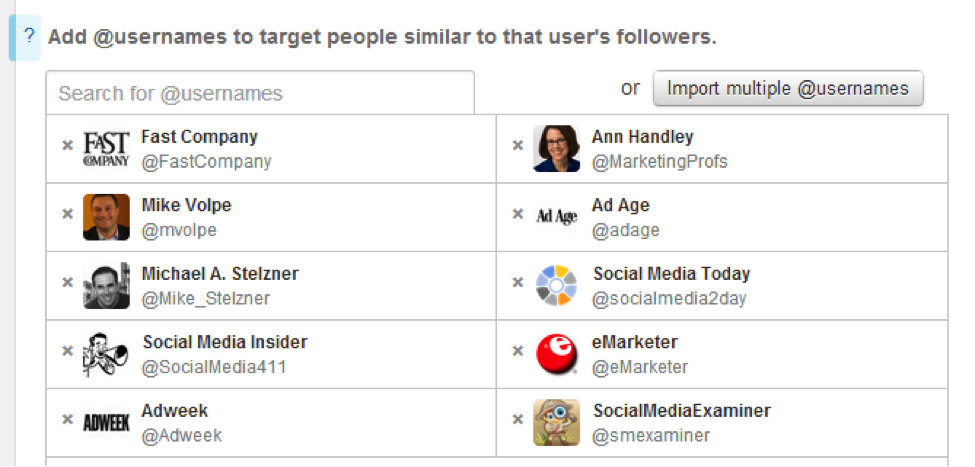
What’s the difference? Targeting by interests and followers allows you to create a list of Twitter usernames, and then target users whose interests are similar to the interests of those users’ followers. A great use of this type of targeting is compiling a small list of the top influencers in your industry. For example, to promote  How to Use Twitter for Business ebook, I’ll want to target an audience of users interested in social media. Targeting by interests and followers allows me to say, “show these tweets to people who are like Mike Volpe’s, Social Media Examiner’s, and Social Media Today’s followers,” and then I’ve created a large audience that’s still tailored to the topic of my content.
With this targeting option, you can also add a list of interest categories -- so I could say, for example, “show these tweets to people interested in Marketing, Social Media, or Lead Generation.” Again, this creates a broad audience focused on the topic of the content or products you’re promoting.
Targeting by interests and followers
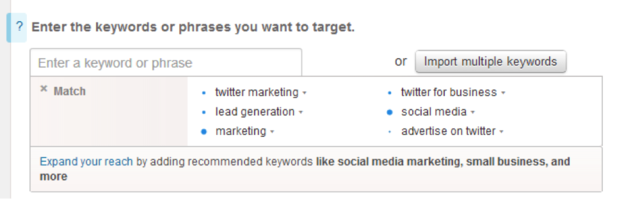
Targeting by keywords allows you to reach people that search, tweet about, or engage with specific keywords. You can also choose to have your tweets appear in either users’ timelines or in search results. The benefit of this type of targeting is that it helps you define a more qualified audience, since these people are actively looking for or engaging with those specific keywords that are relevant to your offer.
So if I’m promoting NIVIINFOTECH How to Use Twitter for Business ebook, I might set up a keywords-based campaign with some related keywords, like this:
Targeting by keywords
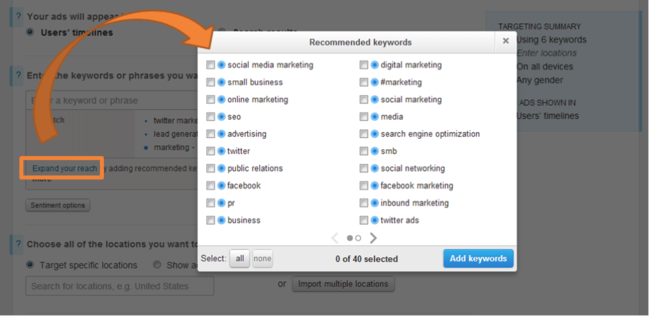
Twitter also included a feature that recommends additional keywords to include in your campaign (just click on “Expand your reach”) so you can make sure you’re not missing out on any highly-searched relevant terms:
Expand your reach feature
Finally, targeting Tailored Audiences allows you to run retargeting campaigns through Twitter. You'll need to work with one of Twitter's ads partners to build audiences based on pixels on your site or by matching lists from your database. This option is a bit more complicated, so I'd recommend reading up on the details here.
Tailored Audiences
How do I choose? Targeting by interests and followers is best if you’re looking to get in front of new audiences, or if you’re looking to focus more on brand publicity. This option will yield a larger, less qualified audience. Targeting by keywords, on the other hand, is useful if you’re looking for users with potential product interest or purchase intent. This option will give you a smaller but more qualified audience.
Note: I’d recommend trying both types of targeting. Set up an A/B test where you have a campaign of each type with the same tweets, and see which performs better for you.. If you're looking to do more advanced retargeting, try Tailored Audiences.

Step 3: Choose From Additional Targeting Options

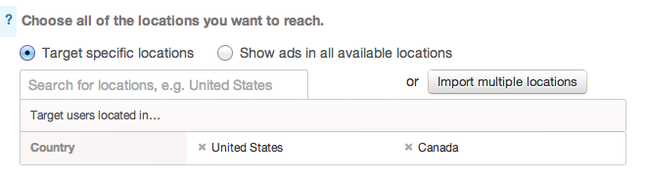
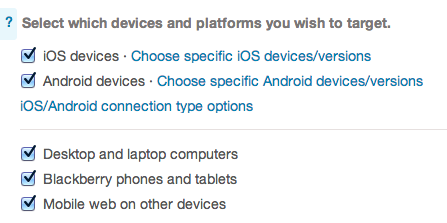
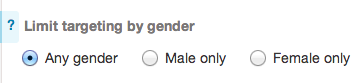
What are my options? Beyond targeting certain interests and keywords, you can also choose to target your audience by location, device, and gender.
How do I choose? You’ll want to target by location if you run a local business, or if you sell primarily to specific regions (whether that’s your city or North America).
Target by location
You can also select which devices you’d like your promoted tweets to be displayed on -- any combination of desktop and the various mobile devices. This is a great targeting option if your product or service caters more specifically to people on the go, or if your website visitors are most likely to convert on your offer when they’re in the office.
Target by device
Finally, if your product or service caters primarily to either males or females, you should take advantage of the gender targeting option.
Target by gender

Step 4: Create Your Tweets

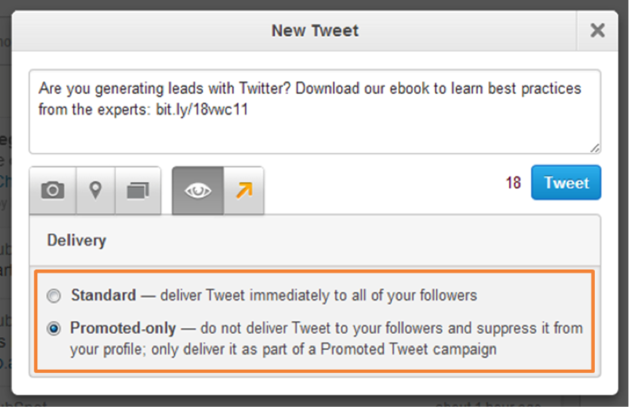
This is the fun part! Once you’ve determined the structure of your campaigns and your target audience, go ahead and create the tweets you’d like to promote. You can either select from existing tweets in your account, or create new ones.
When crafting a new tweet, click on the eye icon to select delivery type -- standard (which will promote it immediately to your followers just like an organic tweet), or promoted-only (which will only promote it through your Twitter Ads campaign).
Create your promoted tweets
And there you have it! Simply assign your campaign a daily budget and a maximum spend limit, and set it live. Be sure to keep an eye on your campaigns as they run, and continue to optimize them for better results.
What types of Twitter ads work best for your campaigns? What targeting methods have you found to be most successful? Let us know in the comments!